 CCC Help German
How to uninstall CCC Help German from your system
This info is about CCC Help German for Windows. Below you can find details on how to uninstall it from your PC. It is written by Advanced Micro Devices, Inc.. Check out here for more details on Advanced Micro Devices, Inc.. Further information about CCC Help German can be seen at http://www.amd.com. CCC Help German is typically set up in the C:\Program Files (x86)\ATI Technologies folder, but this location may differ a lot depending on the user's choice while installing the program. CCC.exe is the CCC Help German's primary executable file and it occupies circa 292.50 KB (299520 bytes) on disk.CCC Help German is composed of the following executables which occupy 7.84 MB (8220160 bytes) on disk:
- CCC.exe (292.50 KB)
- CCCInstall.exe (316.50 KB)
- CLI.exe (304.00 KB)
- installShell.exe (236.00 KB)
- installShell64.exe (336.00 KB)
- LOG.exe (71.00 KB)
- MMLoadDrvPXDiscrete.exe (51.50 KB)
- MOM.exe (292.50 KB)
- SLSTaskbar.exe (1.98 MB)
- SLSTaskbar64.exe (2.51 MB)
- CLIStart.exe (748.25 KB)
- CLIStart.exe (729.75 KB)
This data is about CCC Help German version 2013.1211.1507.27115 alone. You can find below info on other application versions of CCC Help German:
- 2013.0328.2217.38225
- 2012.0806.1212.19931
- 2012.0928.1531.26058
- 2012.0821.2158.37544
- 2014.0812.1102.17905
- 2013.0910.2221.38361
- 2014.0704.2132.36938
- 2012.0412.0346.4710
- 2014.1120.2122.38423
- 2014.0915.1812.30937
- 2014.0417.2225.38446
- 2012.1219.1520.27485
- 2012.0918.0259.3365
- 2013.1206.1602.28764
- 2013.0925.0644.10236
- 2013.0622.2226.38490
- 2013.0429.2312.39747
- 2011.1109.2211.39826
- 2012.0329.2311.39738
- 2012.0704.2138.36919
- 2013.0416.2337.40605
- 2012.0504.1553.26509
- 2013.1002.1734.29729
- 2013.0722.2225.38431
- 2014.0605.2236.38795
- 2013.1101.1243.20992
- 2012.0806.1155.19437
- 2012.0913.1836.31603
- 2014.0418.2208.37947
- 2013.1206.1712.30857
- 2013.0416.1035.17145
- 2012.0808.1023.16666
- 2014.0406.2234.38727
- 2011.0928.0606.9079
- 2011.1013.1701.28713
- 2014.0415.1504.25206
- 2011.1025.2230.38573
- 2014.0819.2247.39098
- 2014.0423.0448.6734
- 2012.0405.2204.37728
- 2011.1205.2214.39827
- 2014.0402.0433.6267
- 2012.0315.1620.27344
- 2012.0611.1250.21046
- 2012.0229.1328.23957
- 2012.0309.0042.976
- 2012.1116.1514.27190
- 2012.0719.2148.37214
- 2012.0213.1643.29893
- 2014.0616.0813.12899
- 2013.1220.1319.23864
- 2011.0930.2208.37895
- 2014.1204.1736.31659
- 2013.1105.0849.15791
- 2013.0115.1550.28388
- 2011.0915.1430.24206
- 2013.1008.0931.15229
- 2013.1223.0215.3934
- 2011.0810.1308.21744
- 2014.1203.0142.3038
- 2013.0424.1658.28626
- 2012.0308.2332.42157
- 2012.0727.2121.36516
- 2013.0911.2153.37488
- 2013.0424.1224.20315
- 2012.0704.0121.388
- 2013.0314.1032.17070
- 2012.0516.1006.16142
- 2011.1105.2337.40591
- 2014.0731.2257.39402
- 2013.1116.2152.39252
- 2011.1223.0327.5994
- 2014.0816.2218.38235
- 2012.1101.0107.126
- 2013.0425.0224.2413
- 2013.0505.0430.6200
- 2012.0214.2236.40551
- 2014.0514.1047.17499
- 2013.0909.1636.27977
- 2012.0418.0644.10054
- 2012.0117.2241.40496
- 2014.0107.0543.10171
- 2013.1029.1736.29798
- 2013.0905.0311.3832
- 2014.0402.0443.6576
- 2014.0811.2302.39561
- 2014.0522.2156.37579
- 2013.0830.1943.33589
- 2013.0605.2326.40281
- 2013.0427.2217.38208
- 2011.0728.1755.30366
- 2014.0304.1708.30728
- 2012.0214.2217.39913
- 2012.0418.0354.4954
- 2011.1123.2351.42795
- 2012.1116.1444.26409
- 2013.0830.0146.1272
- 2013.0214.1718.31049
- 2014.0322.2205.37866
- 2014.0215.0455.8750
A way to uninstall CCC Help German from your PC using Advanced Uninstaller PRO
CCC Help German is a program offered by Advanced Micro Devices, Inc.. Sometimes, computer users decide to uninstall this program. This can be easier said than done because uninstalling this manually takes some advanced knowledge regarding removing Windows applications by hand. The best QUICK procedure to uninstall CCC Help German is to use Advanced Uninstaller PRO. Here is how to do this:1. If you don't have Advanced Uninstaller PRO on your system, install it. This is a good step because Advanced Uninstaller PRO is one of the best uninstaller and all around utility to take care of your PC.
DOWNLOAD NOW
- navigate to Download Link
- download the program by pressing the green DOWNLOAD NOW button
- set up Advanced Uninstaller PRO
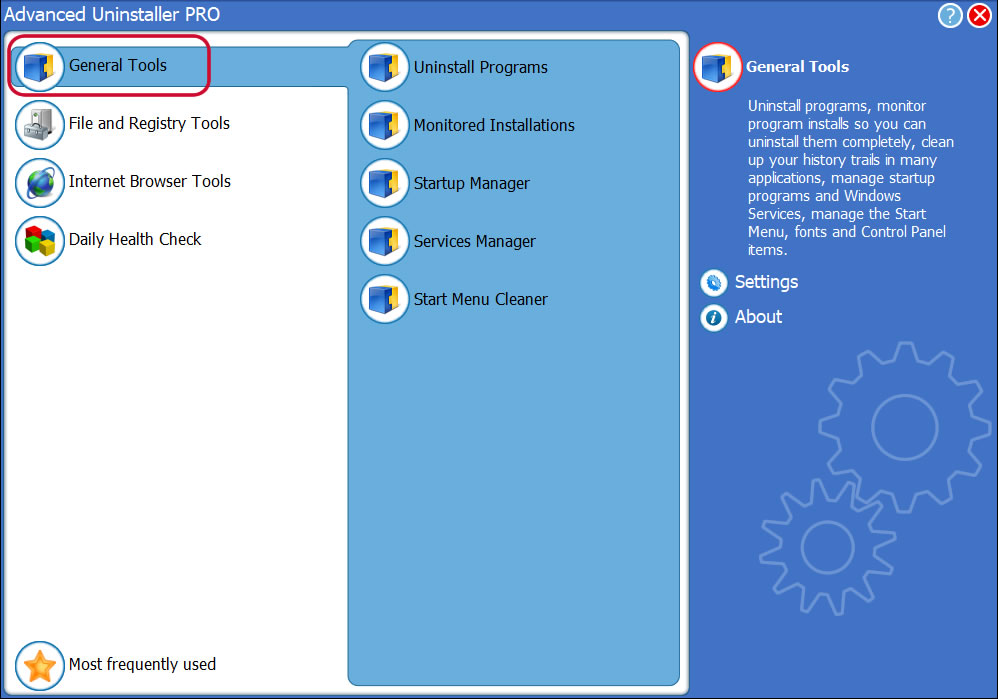
3. Click on the General Tools category
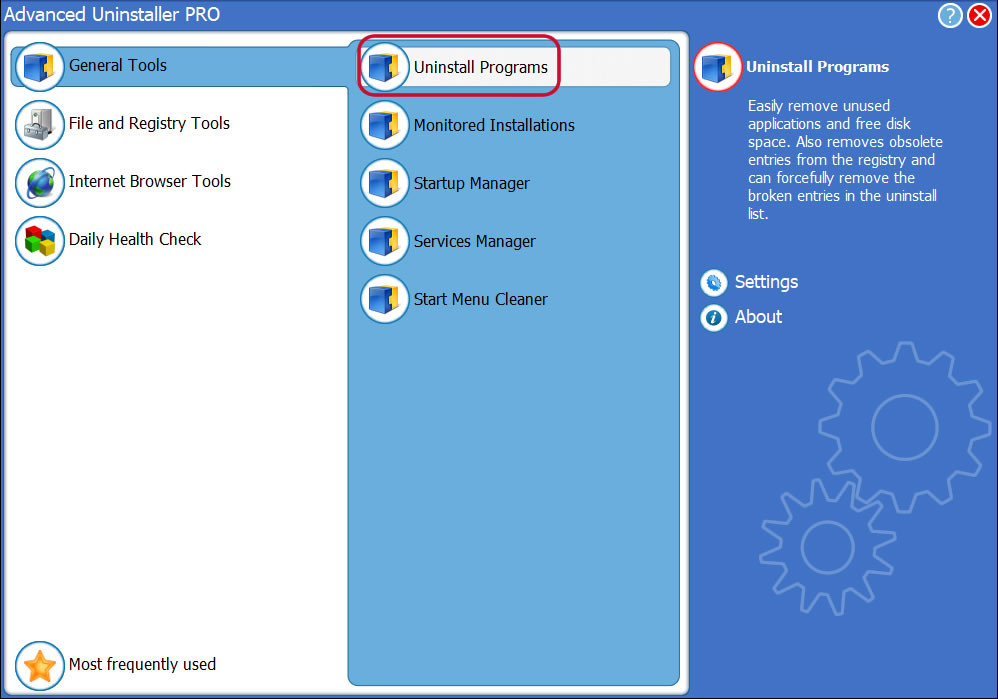
4. Activate the Uninstall Programs button
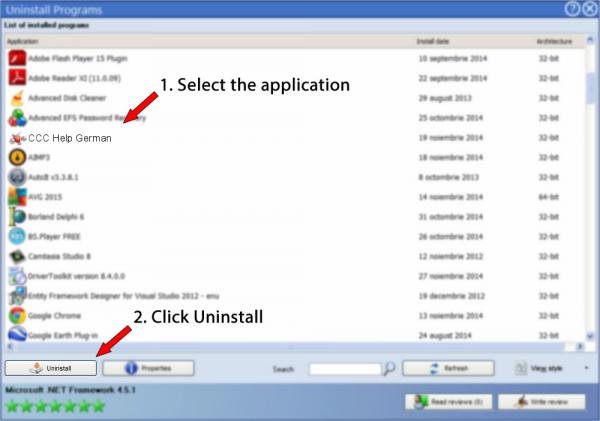
5. All the programs installed on the PC will be made available to you
6. Scroll the list of programs until you locate CCC Help German or simply activate the Search field and type in "CCC Help German". If it exists on your system the CCC Help German application will be found automatically. Notice that after you click CCC Help German in the list of applications, some information regarding the program is available to you:
- Safety rating (in the lower left corner). This explains the opinion other people have regarding CCC Help German, from "Highly recommended" to "Very dangerous".
- Reviews by other people - Click on the Read reviews button.
- Technical information regarding the app you are about to uninstall, by pressing the Properties button.
8. After uninstalling CCC Help German, Advanced Uninstaller PRO will ask you to run an additional cleanup. Click Next to go ahead with the cleanup. All the items that belong CCC Help German which have been left behind will be found and you will be asked if you want to delete them. By removing CCC Help German using Advanced Uninstaller PRO, you can be sure that no registry items, files or directories are left behind on your disk.
Your system will remain clean, speedy and able to run without errors or problems.
Geographical user distribution


Disclaimer
The text above is not a recommendation to remove CCC Help German by Advanced Micro Devices, Inc. from your PC, nor are we saying that CCC Help German by Advanced Micro Devices, Inc. is not a good application for your computer. This page simply contains detailed instructions on how to remove CCC Help German supposing you decide this is what you want to do. The information above contains registry and disk entries that Advanced Uninstaller PRO stumbled upon and classified as "leftovers" on other users' computers.
2016-06-21 / Written by Daniel Statescu for Advanced Uninstaller PRO
follow @DanielStatescuLast update on: 2016-06-20 23:44:39.517