 Foxit Reader
A guide to uninstall Foxit Reader from your PC
This web page is about Foxit Reader for Windows. Below you can find details on how to uninstall it from your PC. It is produced by Foxit Corporation. Check out here where you can read more on Foxit Corporation. Please follow http://www.foxitsoftware.com/?Language=en if you want to read more on Foxit Reader on Foxit Corporation's website. Foxit Reader is usually installed in the C:\Program Files\Foxit Software\Foxit Reader folder, subject to the user's choice. C:\Program Files\Foxit Software\Foxit Reader\unins000.exe is the full command line if you want to remove Foxit Reader. The application's main executable file has a size of 32.28 MB (33846336 bytes) on disk and is called Foxit Reader.exe.The following executables are incorporated in Foxit Reader. They take 42.28 MB (44335792 bytes) on disk.
- Foxit Reader.exe (32.28 MB)
- Foxit Updater.exe (7.32 MB)
- unins000.exe (1.82 MB)
- UninstallPrint.exe (737.96 KB)
- FXC_ProxyProcess.exe (59.06 KB)
- FoxitPrevhost.exe (93.96 KB)
This info is about Foxit Reader version 6.0.3.524 only. For other Foxit Reader versions please click below:
- 5.1.5.412
- 3.2.0.303
- 6.2.1.618
- 6.0.4.719
- 5.4.4.1128
- 6.0.10.1213
- 5.4.5.0114
- 3.1.4.1125
- 5.4.3.920
- 6.1.1.1025
- 6.0.5.618
- 6.0.11.225
- 4.3.1.323
- 6.1.4.217
- 4.2.0.928
- 6.0.1.316
- 5.0.2.718
- 6.0.2.407
- 6.1.4.0217
- 4.2.0.0928
- 4.3.0.1110
- 5.3.1.619
- 6.0.5.0618
- 6.2.2.0802
- 5.4.2.901
- 6.1.3.422
- 6.0.4.912
- 3.0.20130813
- 4.3.1.218
- 6.1.1.1031
- 5.4.5.114
- 6.2.0.429
- 6.2.3.815
- 5.3.1.0606
- 5.3.0.423
- 6.0.1.309
- 3.0.20130423
- 5.3.1.606
- 6.0.6.722
- Unknown
- 6.1.5.624
- 3.0.20140211
- 5.4.5.124
- 7.0.3.916
- 6.1.3.321
- 6.1.2.1224
- 6.1.3.506
- 3.3.1.518
- 4.3.1.118
- 6.0.2.413
- 6.2.2.802
- 5.4.4.1023
- 7.1.3.320
- 5.1.4.1124
Some files, folders and Windows registry entries will not be removed when you are trying to remove Foxit Reader from your PC.
Folders found on disk after you uninstall Foxit Reader from your computer:
- C:\Program Files (x86)\Foxit Software\Foxit Reader
- C:\Users\%user%\AppData\Roaming\Foxit Software\Foxit Reader
The files below remain on your disk by Foxit Reader's application uninstaller when you removed it:
- C:\Program Files (x86)\Foxit Software\Foxit Reader\Advertisement\Add your own PDF features.bmp
- C:\Program Files (x86)\Foxit Software\Foxit Reader\Advertisement\Batch convert PDFs .bmp
- C:\Program Files (x86)\Foxit Software\Foxit Reader\Advertisement\Business Ready PDF Tool .bmp
- C:\Program Files (x86)\Foxit Software\Foxit Reader\Advertisement\Create your own PDF viewer.bmp
- C:\Program Files (x86)\Foxit Software\Foxit Reader\Advertisement\Customize User Interface.bmp
- C:\Program Files (x86)\Foxit Software\Foxit Reader\Advertisement\Easy PDF annotation on iPads.bmp
- C:\Program Files (x86)\Foxit Software\Foxit Reader\Advertisement\Extract PDF contents.bmp
- C:\Program Files (x86)\Foxit Software\Foxit Reader\Advertisement\Fast mobile PDF reader on iPad.bmp
- C:\Program Files (x86)\Foxit Software\Foxit Reader\Advertisement\Fastest PDF Index and Search.bmp
- C:\Program Files (x86)\Foxit Software\Foxit Reader\Advertisement\Integrate with Security Solutions.bmp
- C:\Program Files (x86)\Foxit Software\Foxit Reader\Advertisement\OCR Text Recognition.bmp
- C:\Program Files (x86)\Foxit Software\Foxit Reader\Advertisement\Powerful Word Processor.bmp
- C:\Program Files (x86)\Foxit Software\Foxit Reader\Advertisement\Profile.xml
- C:\Program Files (x86)\Foxit Software\Foxit Reader\Advertisement\ProfileRibbon.xml
- C:\Program Files (x86)\Foxit Software\Foxit Reader\Advertisement\Protect PDFs with AD RMS.bmp
- C:\Program Files (x86)\Foxit Software\Foxit Reader\Advertisement\Protect Sensitive PDF Documents.bmp
- C:\Program Files (x86)\Foxit Software\Foxit Reader\Advertisement\Read and modify PDFs on iPads.bmp
- C:\Program Files (x86)\Foxit Software\Foxit Reader\Advertisement\Read PDFs on iPads.bmp
- C:\Program Files (x86)\Foxit Software\Foxit Reader\Advertisement\Redact your PDFs.bmp
- C:\Program Files (x86)\Foxit Software\Foxit Reader\Advertisement\ribbon create pdf form scanner documents.bmp
- C:\Program Files (x86)\Foxit Software\Foxit Reader\Advertisement\ribbon Create PDF from Office-convert PDF to office.bmp
- C:\Program Files (x86)\Foxit Software\Foxit Reader\Advertisement\ribbon Design form fields easily.bmp
- C:\Program Files (x86)\Foxit Software\Foxit Reader\Advertisement\ribbon Edit and reflow paragraphs in PDF files.bmp
- C:\Program Files (x86)\Foxit Software\Foxit Reader\Advertisement\ribbon Enterprise PDF Reader.bmp
- C:\Program Files (x86)\Foxit Software\Foxit Reader\Advertisement\ribbon Fastest PDF Search and Index.bmp
- C:\Program Files (x86)\Foxit Software\Foxit Reader\Advertisement\ribbon Integrate PDF into your application.bmp
- C:\Program Files (x86)\Foxit Software\Foxit Reader\Advertisement\ribbon Integrate PDF into your mobile apps.bmp
- C:\Program Files (x86)\Foxit Software\Foxit Reader\Advertisement\ribbon Powerful Word Processor.bmp
- C:\Program Files (x86)\Foxit Software\Foxit Reader\Advertisement\ribbon Protect Sensitive PDF Documents.bmp
- C:\Program Files (x86)\Foxit Software\Foxit Reader\Advertisement\ribbon Protect your PDF files with AD RMS.bmp
- C:\Program Files (x86)\Foxit Software\Foxit Reader\Advertisement\ribbon View and annotate PDFs.bmp
- C:\Program Files (x86)\Foxit Software\Foxit Reader\Advertisement\ribbon view PDFs on iPads.bmp
- C:\Program Files (x86)\Foxit Software\Foxit Reader\Advertisement\Sign and Send PDF Docs with DocuSign .bmp
- C:\Program Files (x86)\Foxit Software\Foxit Reader\Advertisement\Unique editing capabilities.bmp
- C:\Program Files (x86)\Foxit Software\Foxit Reader\Advertisement\View PDFs on mobile devices.bmp
- C:\Program Files (x86)\Foxit Software\Foxit Reader\docusign\progress_bar.gif
- C:\Program Files (x86)\Foxit Software\Foxit Reader\docusign\progress_circle.gif
- C:\Program Files (x86)\Foxit Software\Foxit Reader\docusign\transfer.html
- C:\Program Files (x86)\Foxit Software\Foxit Reader\docusign\transfer1.html
- C:\Program Files (x86)\Foxit Software\Foxit Reader\Foxit Cloud\FCUpdateService.exe
- C:\Program Files (x86)\Foxit Software\Foxit Reader\Foxit Reader.exe
- C:\Program Files (x86)\Foxit Software\Foxit Reader\Foxit Updater.exe
- C:\Program Files (x86)\Foxit Software\Foxit Reader\FXCUSTOM.dll
- C:\Program Files (x86)\Foxit Software\Foxit Reader\lex\accent.tlx
- C:\Program Files (x86)\Foxit Software\Foxit Reader\lex\correct.tlx
- C:\Program Files (x86)\Foxit Software\Foxit Reader\lex\ssceam.tlx
- C:\Program Files (x86)\Foxit Software\Foxit Reader\lex\ssceam2.clx
- C:\Program Files (x86)\Foxit Software\Foxit Reader\lex\sscebr.tlx
- C:\Program Files (x86)\Foxit Software\Foxit Reader\lex\sscebr2.clx
- C:\Program Files (x86)\Foxit Software\Foxit Reader\lex\ssceca.tlx
- C:\Program Files (x86)\Foxit Software\Foxit Reader\lex\ssceca2.clx
- C:\Program Files (x86)\Foxit Software\Foxit Reader\lex\tech.tlx
- C:\Program Files (x86)\Foxit Software\Foxit Reader\lex\userdic.tlx
- C:\Program Files (x86)\Foxit Software\Foxit Reader\plugins\CommentsSummary.fpi
- C:\Program Files (x86)\Foxit Software\Foxit Reader\plugins\ConvertToPDFShellExtension_x64.dll
- C:\Program Files (x86)\Foxit Software\Foxit Reader\plugins\Creator\FXC_ProxyProcess.exe
- C:\Program Files (x86)\Foxit Software\Foxit Reader\plugins\Creator\x64\ConvertToPDF_x64.dll
- C:\Program Files (x86)\Foxit Software\Foxit Reader\plugins\Creator\x86\ConvertToPDF_x86.dll
- C:\Program Files (x86)\Foxit Software\Foxit Reader\plugins\docusign_plugin.fpi
- C:\Program Files (x86)\Foxit Software\Foxit Reader\plugins\facebook_plugin.fpi
- C:\Program Files (x86)\Foxit Software\Foxit Reader\plugins\FoxitReaderBrowserAx.dll
- C:\Program Files (x86)\Foxit Software\Foxit Reader\plugins\FRMSPlgV2.fpi
- C:\Program Files (x86)\Foxit Software\Foxit Reader\plugins\IntegrateWithSP.fpi
- C:\Program Files (x86)\Foxit Software\Foxit Reader\plugins\npFoxitReaderPlugin.dll
- C:\Program Files (x86)\Foxit Software\Foxit Reader\plugins\Speech.fpi
- C:\Program Files (x86)\Foxit Software\Foxit Reader\plugins\Updater.fpi
- C:\Program Files (x86)\Foxit Software\Foxit Reader\Release Note.txt
- C:\Program Files (x86)\Foxit Software\Foxit Reader\Shell Extensions\FoxitPrevHndlr.dll
- C:\Program Files (x86)\Foxit Software\Foxit Reader\Shell Extensions\FoxitPrevhost.exe
- C:\Program Files (x86)\Foxit Software\Foxit Reader\Shell Extensions\FoxitThumbnailHndlr_x64.dll
- C:\Program Files (x86)\Foxit Software\Foxit Reader\Skins\Normal\Black\AppCaption\Btn_Help.png
- C:\Program Files (x86)\Foxit Software\Foxit Reader\Skins\Normal\Black\AppCaption\Btn_Style.png
- C:\Program Files (x86)\Foxit Software\Foxit Reader\Skins\Normal\Black\AppCaption\Btn_Style_S.png
- C:\Program Files (x86)\Foxit Software\Foxit Reader\Skins\Normal\Black\AppCaption\CaptionTitle.png
- C:\Program Files (x86)\Foxit Software\Foxit Reader\Skins\Normal\Black\AppCaption\SysBtn_Area.png
- C:\Program Files (x86)\Foxit Software\Foxit Reader\Skins\Normal\Black\AppCaption\SysBtn_Area_Normal.png
- C:\Program Files (x86)\Foxit Software\Foxit Reader\Skins\Normal\Black\AppCaption\SysBtn_Back.png
- C:\Program Files (x86)\Foxit Software\Foxit Reader\Skins\Normal\Black\AppCaption\SysBtn_Back2.png
- C:\Program Files (x86)\Foxit Software\Foxit Reader\Skins\Normal\Black\AppCaption\SysBtn_Close.png
- C:\Program Files (x86)\Foxit Software\Foxit Reader\Skins\Normal\Black\AppCaption\SysBtn_Close_S.png
- C:\Program Files (x86)\Foxit Software\Foxit Reader\Skins\Normal\Black\AppCaption\SysBtn_Maximize.png
- C:\Program Files (x86)\Foxit Software\Foxit Reader\Skins\Normal\Black\AppCaption\SysBtn_Maximize_S.png
- C:\Program Files (x86)\Foxit Software\Foxit Reader\Skins\Normal\Black\AppCaption\SysBtn_Minimize.png
- C:\Program Files (x86)\Foxit Software\Foxit Reader\Skins\Normal\Black\AppCaption\SysBtn_Minimize_S.png
- C:\Program Files (x86)\Foxit Software\Foxit Reader\Skins\Normal\Black\AppCaption\SysBtn_Restore.png
- C:\Program Files (x86)\Foxit Software\Foxit Reader\Skins\Normal\Black\AppCaption\SysBtn_Restore_S.png
- C:\Program Files (x86)\Foxit Software\Foxit Reader\Skins\Normal\Black\Black.xml
- C:\Program Files (x86)\Foxit Software\Foxit Reader\Skins\Normal\Black\CaptionBar\BkGround.png
- C:\Program Files (x86)\Foxit Software\Foxit Reader\Skins\Normal\Black\CaptionBar\Border.png
- C:\Program Files (x86)\Foxit Software\Foxit Reader\Skins\Normal\Black\CaptionBar\Button.png
- C:\Program Files (x86)\Foxit Software\Foxit Reader\Skins\Normal\Black\MainWnd\Border.png
- C:\Program Files (x86)\Foxit Software\Foxit Reader\Skins\Normal\Black\MainWnd\BorderCaption.png
- C:\Program Files (x86)\Foxit Software\Foxit Reader\Skins\Normal\Black\MainWnd\BorderMDIChild.png
- C:\Program Files (x86)\Foxit Software\Foxit Reader\Skins\Normal\Black\Menu\Border.png
- C:\Program Files (x86)\Foxit Software\Foxit Reader\Skins\Normal\Black\Menu\Item_Back.png
- C:\Program Files (x86)\Foxit Software\Foxit Reader\Skins\Normal\Black\Menu\Item_Marker_C.png
- C:\Program Files (x86)\Foxit Software\Foxit Reader\Skins\Normal\Black\Menu\Item_Marker_R.png
- C:\Program Files (x86)\Foxit Software\Foxit Reader\Skins\Normal\Black\Menu\MenuBarBtn.png
- C:\Program Files (x86)\Foxit Software\Foxit Reader\Skins\Normal\Black\Menu\MenuHighlight.png
- C:\Program Files (x86)\Foxit Software\Foxit Reader\Skins\Normal\Black\Menu\MenuHighlightDisabled.png
Registry keys:
- HKEY_CLASSES_ROOT\*\shellex\ContextMenuHandlers\Foxit_ConvertToPDF_Reader
- HKEY_CURRENT_USER\Software\Foxit Software\Foxit Reader 6.0
- HKEY_CURRENT_USER\Software\Microsoft\Foxit Software\Foxit Reader
- HKEY_LOCAL_MACHINE\Software\Foxit Software\Foxit Reader
- HKEY_LOCAL_MACHINE\Software\Foxit Software\Foxit Update\Foxit Reader
- HKEY_LOCAL_MACHINE\Software\Microsoft\Windows\CurrentVersion\Uninstall\Foxit Reader_is1
- HKEY_LOCAL_MACHINE\Software\MozillaPlugins\@foxitsoftware.com/Foxit Reader Plugin,version=1.0,application/vnd.fdf
Open regedit.exe to remove the registry values below from the Windows Registry:
- HKEY_CLASSES_ROOT\Local Settings\Software\Microsoft\Windows\Shell\MuiCache\C:\PROGRAM FILES (X86)\FOXIT SOFTWARE\FOXIT READER\FOXIT READER.EXE.ApplicationCompany
- HKEY_CLASSES_ROOT\Local Settings\Software\Microsoft\Windows\Shell\MuiCache\C:\PROGRAM FILES (X86)\FOXIT SOFTWARE\FOXIT READER\FOXIT READER.EXE.FriendlyAppName
A way to erase Foxit Reader from your PC with Advanced Uninstaller PRO
Foxit Reader is a program offered by the software company Foxit Corporation. Frequently, people try to remove this application. Sometimes this is difficult because performing this manually takes some knowledge related to removing Windows applications by hand. One of the best EASY manner to remove Foxit Reader is to use Advanced Uninstaller PRO. Take the following steps on how to do this:1. If you don't have Advanced Uninstaller PRO on your PC, install it. This is good because Advanced Uninstaller PRO is one of the best uninstaller and all around tool to maximize the performance of your computer.
DOWNLOAD NOW
- go to Download Link
- download the program by pressing the DOWNLOAD NOW button
- install Advanced Uninstaller PRO
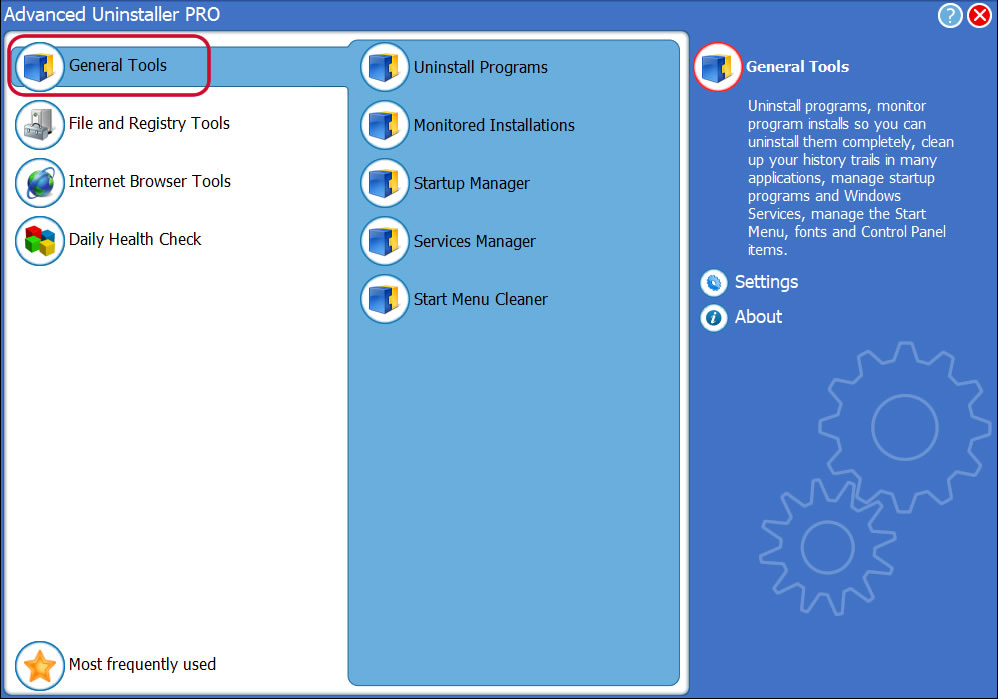
3. Click on the General Tools button
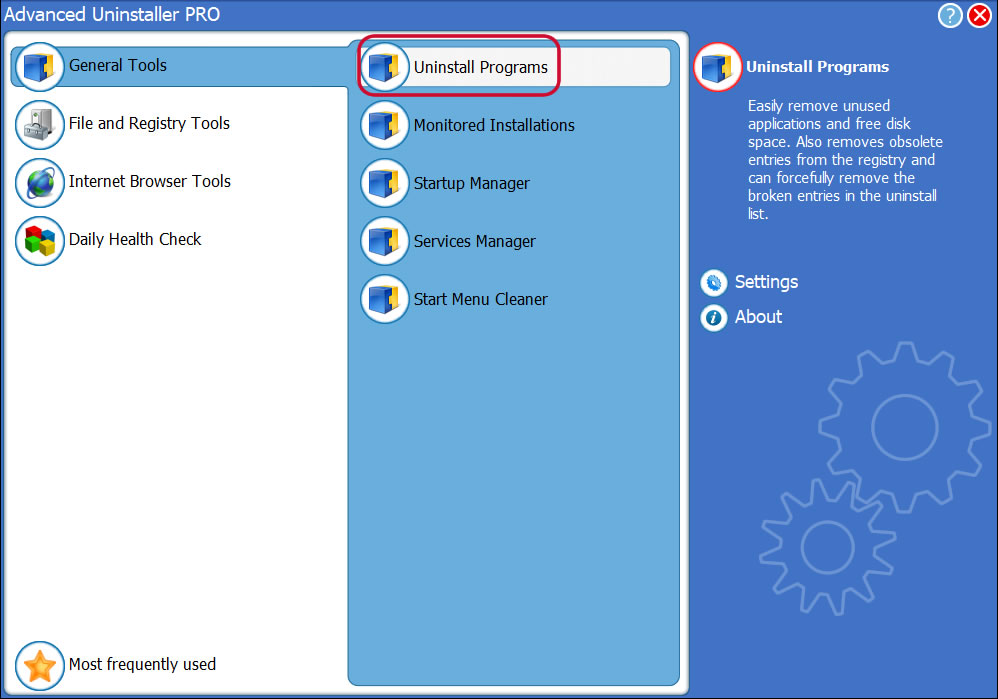
4. Press the Uninstall Programs tool
5. A list of the programs existing on your computer will be shown to you
6. Scroll the list of programs until you find Foxit Reader or simply activate the Search feature and type in "Foxit Reader". If it exists on your system the Foxit Reader application will be found very quickly. After you select Foxit Reader in the list of applications, some data regarding the program is available to you:
- Safety rating (in the left lower corner). The star rating explains the opinion other users have regarding Foxit Reader, ranging from "Highly recommended" to "Very dangerous".
- Reviews by other users - Click on the Read reviews button.
- Details regarding the program you want to uninstall, by pressing the Properties button.
- The web site of the program is: http://www.foxitsoftware.com/?Language=en
- The uninstall string is: C:\Program Files\Foxit Software\Foxit Reader\unins000.exe
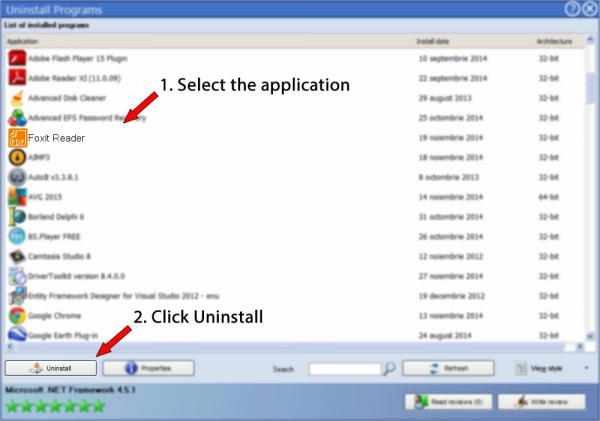
8. After removing Foxit Reader, Advanced Uninstaller PRO will ask you to run an additional cleanup. Press Next to go ahead with the cleanup. All the items that belong Foxit Reader that have been left behind will be found and you will be asked if you want to delete them. By removing Foxit Reader with Advanced Uninstaller PRO, you can be sure that no registry entries, files or directories are left behind on your system.
Your PC will remain clean, speedy and able to take on new tasks.
Geographical user distribution


Disclaimer
The text above is not a recommendation to uninstall Foxit Reader by Foxit Corporation from your PC, we are not saying that Foxit Reader by Foxit Corporation is not a good application. This text simply contains detailed instructions on how to uninstall Foxit Reader supposing you decide this is what you want to do. Here you can find registry and disk entries that other software left behind and Advanced Uninstaller PRO stumbled upon and classified as "leftovers" on other users' PCs.
2016-06-23 / Written by Daniel Statescu for Advanced Uninstaller PRO
follow @DanielStatescuLast update on: 2016-06-23 12:15:05.560