Publishers

Microsoft Office Proof (German) 2007 Microsoft Office Proof (German) 2007


A guide to uninstall Microsoft Office Proof (German) 2007 from your computer

Microsoft Office Proof (German) 2007 is a computer program. This page holds details on how to remove it from your computer. It was developed for Windows by Microsoft Corporation. More data about Microsoft Corporation can be found here. Microsoft Office Proof (German) 2007 is commonly set up in the C:\Program Files\Microsoft Office directory, however this location can differ a lot depending on the user's option while installing the application. You can remove Microsoft Office Proof (German) 2007 by clicking on the Start menu of Windows and pasting the command line MsiExec.exe /X{90120000-001F-0407-0000-0000000FF1CE}. Note that you might receive a notification for administrator rights. Microsoft Office Proof (German) 2007's primary file takes around 17.06 MB (17891112 bytes) and its name is EXCEL.EXE.

Microsoft Office Proof (German) 2007 contains of the executables below. They occupy 40.63 MB (42608112 bytes) on disk.


  • CLVIEW.EXE (200.80 KB)
  • EXCEL.EXE (17.06 MB)
  • excelcnv.exe (13.99 MB)
  • MSOHTMED.EXE (66.30 KB)
  • MSTORDB.EXE (813.28 KB)
  • MSTORE.EXE (142.27 KB)
  • SELFCERT.EXE (491.82 KB)
  • WINWORD.EXE (339.29 KB)
  • Wordconv.exe (20.77 KB)
  • PPTVIEW.EXE (7.55 MB)
...click to view all...

The current page applies to Microsoft Office Proof (German) 2007 version 12.0.4518.1014 alone. Click on the links below for other Microsoft Office Proof (German) 2007 versions:


Some files and registry entries are frequently left behind when you remove Microsoft Office Proof (German) 2007.

Folders left behind when you uninstall Microsoft Office Proof (German) 2007:
  • C:\Program Files (x86)\Microsoft Office

Generally, the following files are left on disk:
  • C:\Program Files (x86)\Microsoft Office\Office12\1049\DataServices\+????? ??????????? ? SQL-???????.odc
  • C:\Program Files (x86)\Microsoft Office\Office12\1049\DataServices\+??????????? ? ?????? ????????? ??????.odc
  • C:\Program Files (x86)\Microsoft Office\Office12\1049\DataServices\DESKTOP.INI
  • C:\Program Files (x86)\Microsoft Office\Office12\1049\DataServices\FOLDER.ICO
  • C:\Program Files (x86)\Microsoft Office\Office12\1049\DATFLO_M.VSS
  • C:\Program Files (x86)\Microsoft Office\Office12\1049\DATFLO_M.VST
  • C:\Program Files (x86)\Microsoft Office\Office12\1049\DATMOD_M.VST
  • C:\Program Files (x86)\Microsoft Office\Office12\1049\DBENGR.VSL
  • C:\Program Files (x86)\Microsoft Office\Office12\1049\DBMODL_M.VST
  • C:\Program Files (x86)\Microsoft Office\Office12\1049\DBSAMPLE.MDB
  • C:\Program Files (x86)\Microsoft Office\Office12\1049\DBWIZ.VSL
  • C:\Program Files (x86)\Microsoft Office\Office12\1049\DEFAULT.CSS
  • C:\Program Files (x86)\Microsoft Office\Office12\1049\DGICON_M.VSS
  • C:\Program Files (x86)\Microsoft Office\Office12\1049\DIMENG_M.VSS
  • C:\Program Files (x86)\Microsoft Office\Office12\1049\DL_RES.DLL
  • C:\Program Files (x86)\Microsoft Office\Office12\1049\DOORSCHD.VRD
  • C:\Program Files (x86)\Microsoft Office\Office12\1049\DRAWTL_M.VSS
  • C:\Program Files (x86)\Microsoft Office\Office12\1049\DRILLD_M.VSS
  • C:\Program Files (x86)\Microsoft Office\Office12\1049\DRILLD_M.VST
  • C:\Program Files (x86)\Microsoft Office\Office12\1049\DRILLDWN.VSL
  • C:\Program Files (x86)\Microsoft Office\Office12\1049\DTLNET_M.VSS
  • C:\Program Files (x86)\Microsoft Office\Office12\1049\DTLNET_M.VST
  • C:\Program Files (x86)\Microsoft Office\Office12\1049\DVCALL_M.VSS
  • C:\Program Files (x86)\Microsoft Office\Office12\1049\DWGCNV.VSL
  • C:\Program Files (x86)\Microsoft Office\Office12\1049\DWGCNV_M.VTX
  • C:\Program Files (x86)\Microsoft Office\Office12\1049\DWGDPRES.DLL
  • C:\Program Files (x86)\Microsoft Office\Office12\1049\EDITRES.DLL
  • C:\Program Files (x86)\Microsoft Office\Office12\1049\EECHIP_M.VSS
  • C:\Program Files (x86)\Microsoft Office\Office12\1049\EECHIP_M.VST
  • C:\Program Files (x86)\Microsoft Office\Office12\1049\EECOMP_M.VSS
  • C:\Program Files (x86)\Microsoft Office\Office12\1049\EEFUND_M.VSS
  • C:\Program Files (x86)\Microsoft Office\Office12\1049\EEGENR_M.VST
  • C:\Program Files (x86)\Microsoft Office\Office12\1049\EEICS_M.VST
  • C:\Program Files (x86)\Microsoft Office\Office12\1049\EEMAIN_M.VSS
  • C:\Program Files (x86)\Microsoft Office\Office12\1049\EEMAPS_M.VSS
  • C:\Program Files (x86)\Microsoft Office\Office12\1049\EEMECH_M.VSS
  • C:\Program Files (x86)\Microsoft Office\Office12\1049\EEPATH_M.VSS
  • C:\Program Files (x86)\Microsoft Office\Office12\1049\EEQUAL_M.VSS
  • C:\Program Files (x86)\Microsoft Office\Office12\1049\EESEMI_M.VSS
  • C:\Program Files (x86)\Microsoft Office\Office12\1049\EESWCH_M.VSS
  • C:\Program Files (x86)\Microsoft Office\Office12\1049\EESYS_M.VST
  • C:\Program Files (x86)\Microsoft Office\Office12\1049\EETCOM_M.VSS
  • C:\Program Files (x86)\Microsoft Office\Office12\1049\EETERM_M.VSS
  • C:\Program Files (x86)\Microsoft Office\Office12\1049\EETRAN_M.VSS
  • C:\Program Files (x86)\Microsoft Office\Office12\1049\EEVHF_M.VSS
  • C:\Program Files (x86)\Microsoft Office\Office12\1049\ELETEL_M.VSS
  • C:\Program Files (x86)\Microsoft Office\Office12\1049\ELETEL_M.VST
  • C:\Program Files (x86)\Microsoft Office\Office12\1049\EMBELL_M.VSS
  • C:\Program Files (x86)\Microsoft Office\Office12\1049\ENTAPP_M.VSS
  • C:\Program Files (x86)\Microsoft Office\Office12\1049\ENTAPP_M.VST
  • C:\Program Files (x86)\Microsoft Office\Office12\1049\ENTITY_M.VSS
  • C:\Program Files (x86)\Microsoft Office\Office12\1049\EPC_M.VSS
  • C:\Program Files (x86)\Microsoft Office\Office12\1049\EPC_M.VST
  • C:\Program Files (x86)\Microsoft Office\Office12\1049\EQPLIST.VRD
  • C:\Program Files (x86)\Microsoft Office\Office12\1049\EXCOBJ_M.VSS
  • C:\Program Files (x86)\Microsoft Office\Office12\1049\EXPRG_M.VSS
  • C:\Program Files (x86)\Microsoft Office\Office12\1049\EXPRG_M.VST
  • C:\Program Files (x86)\Microsoft Office\Office12\1049\EXPTOOWS.DLL
  • C:\Program Files (x86)\Microsoft Office\Office12\1049\EXPTOOWS.XLA
  • C:\Program Files (x86)\Microsoft Office\Office12\1049\FACILITY.VSL
  • C:\Program Files (x86)\Microsoft Office\Office12\1049\FASTN1_M.VSS
  • C:\Program Files (x86)\Microsoft Office\Office12\1049\FASTN2_M.VSS
  • C:\Program Files (x86)\Microsoft Office\Office12\1049\FAULT_M.VSS
  • C:\Program Files (x86)\Microsoft Office\Office12\1049\FAULT_M.VST
  • C:\Program Files (x86)\Microsoft Office\Office12\1049\FLOCH.VRD
  • C:\Program Files (x86)\Microsoft Office\Office12\1049\FLOSHP_M.VSS
  • C:\Program Files (x86)\Microsoft Office\Office12\1049\FLRPLN_M.VST
  • C:\Program Files (x86)\Microsoft Office\Office12\1049\FOREST.CSS
  • C:\Program Files (x86)\Microsoft Office\Office12\1049\FPALL_M.VST
  • C:\Program Files (x86)\Microsoft Office\Office12\1049\FPASSM_M.VSS
  • C:\Program Files (x86)\Microsoft Office\Office12\1049\FPEQP_M.VSS
  • C:\Program Files (x86)\Microsoft Office\Office12\1049\FPVALV_M.VSS
  • C:\Program Files (x86)\Microsoft Office\Office12\1049\FREEQP_M.VSS
  • C:\Program Files (x86)\Microsoft Office\Office12\1049\FURN_M.VSS
  • C:\Program Files (x86)\Microsoft Office\Office12\1049\GANESA_M.VSS
  • C:\Program Files (x86)\Microsoft Office\Office12\1049\GANTT.CSS
  • C:\Program Files (x86)\Microsoft Office\Office12\1049\GANTT.VRD
  • C:\Program Files (x86)\Microsoft Office\Office12\1049\GANTT.VSL
  • C:\Program Files (x86)\Microsoft Office\Office12\1049\GANTT_M.VSS
  • C:\Program Files (x86)\Microsoft Office\Office12\1049\GANTT_M.VST
  • C:\Program Files (x86)\Microsoft Office\Office12\1049\GARDEN_M.VSS
  • C:\Program Files (x86)\Microsoft Office\Office12\1049\GDT_M.VSS
  • C:\Program Files (x86)\Microsoft Office\Office12\1049\GR8GALRY.GRA
  • C:\Program Files (x86)\Microsoft Office\Office12\1049\GRAPH.HXS
  • C:\Program Files (x86)\Microsoft Office\Office12\1049\GRAPH_COL.HXC
  • C:\Program Files (x86)\Microsoft Office\Office12\1049\GRAPH_COL.HXT
  • C:\Program Files (x86)\Microsoft Office\Office12\1049\GRAPH_F_COL.HXK
  • C:\Program Files (x86)\Microsoft Office\Office12\1049\GRAPH_K_COL.HXK
  • C:\Program Files (x86)\Microsoft Office\Office12\1049\GRAPH10.CHM
  • C:\Program Files (x86)\Microsoft Office\Office12\1049\GRINTL32.DLL
  • C:\Program Files (x86)\Microsoft Office\Office12\1049\GRLEX.DLL
  • C:\Program Files (x86)\Microsoft Office\Office12\1049\HOMPLN_M.VST
  • C:\Program Files (x86)\Microsoft Office\Office12\1049\HVAC.VSL
  • C:\Program Files (x86)\Microsoft Office\Office12\1049\HVAC_M.VST
  • C:\Program Files (x86)\Microsoft Office\Office12\1049\HVACC_M.VSS
  • C:\Program Files (x86)\Microsoft Office\Office12\1049\HVACCE_M.VSS
  • C:\Program Files (x86)\Microsoft Office\Office12\1049\HVACD_M.VSS
  • C:\Program Files (x86)\Microsoft Office\Office12\1049\HVACDIFF.VRD
  • C:\Program Files (x86)\Microsoft Office\Office12\1049\HVACDUCT.VRD
  • C:\Program Files (x86)\Microsoft Office\Office12\1049\HVACEQ_M.VSS

Registry that is not cleaned:
  • HKEY_LOCAL_MACHINE\Software\Microsoft\Windows\CurrentVersion\Uninstall\{90120000-001F-0407-0000-0000000FF1CE}


A way to erase Microsoft Office Proof (German) 2007 from your PC with Advanced Uninstaller PRO

Microsoft Office Proof (German) 2007 is a program marketed by the software company Microsoft Corporation. Some users want to uninstall this application. Sometimes this is hard because doing this by hand takes some experience regarding PCs. The best QUICK solution to uninstall Microsoft Office Proof (German) 2007 is to use Advanced Uninstaller PRO. Here are some detailed instructions about how to do this:


1. If you don't have Advanced Uninstaller PRO on your Windows system, add it. This is a good step because Advanced Uninstaller PRO is a very useful uninstaller and general utility to take care of your Windows computer.

DOWNLOAD NOW

  • go to Download Link
  • download the setup by pressing the green DOWNLOAD NOW button
  • install Advanced Uninstaller PRO
2. Start Advanced Uninstaller PRO. Take some time to admire Advanced Uninstaller PRO's interface and number of features available. Advanced Uninstaller PRO is a very useful Windows optimizer.

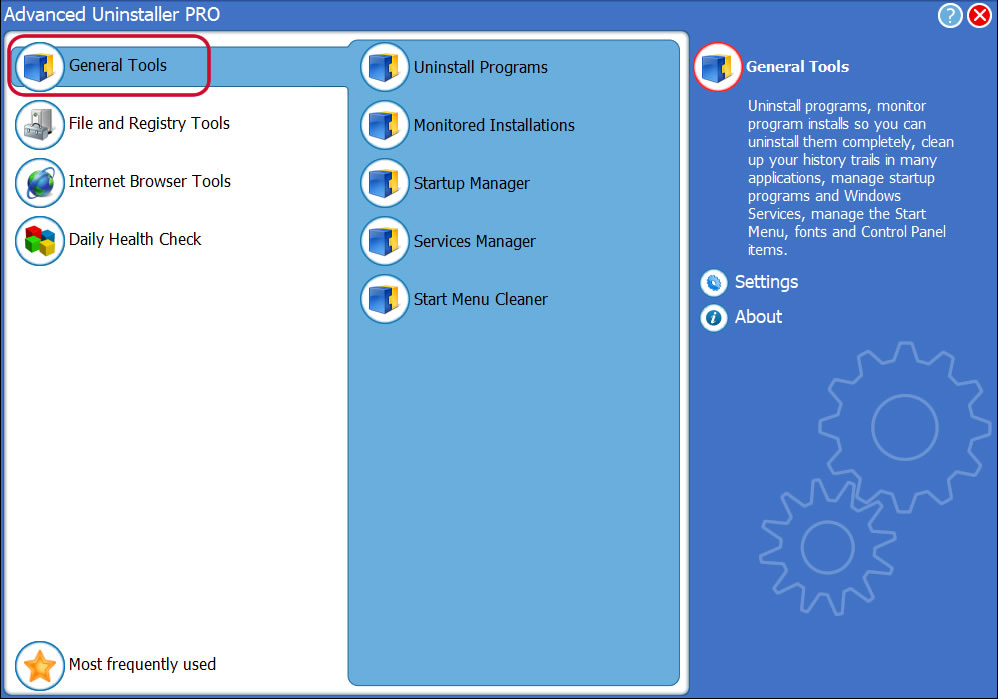
3. Click on the General Tools category
Go to General Tools


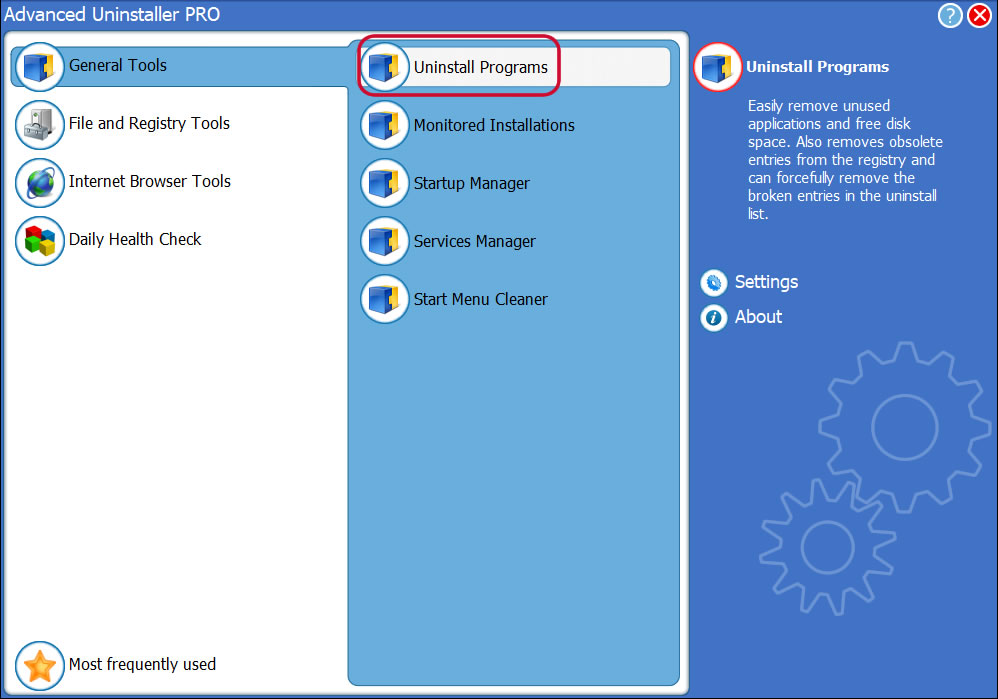
4. Press the Uninstall Programs feature
Go to Uninstall Programs


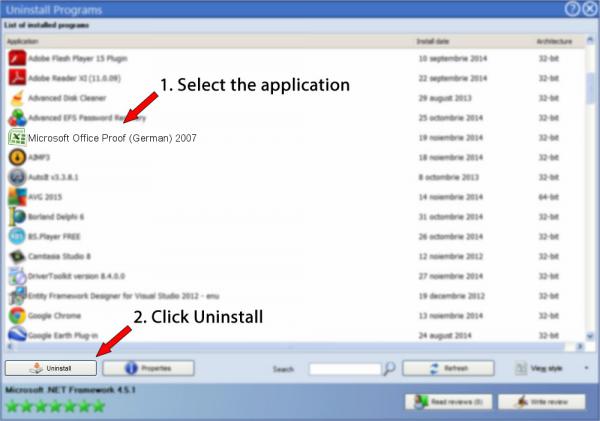
5. All the programs existing on the computer will appear

6. Navigate the list of programs until you locate Microsoft Office Proof (German) 2007 or simply activate the Search feature and type in "Microsoft Office Proof (German) 2007". If it exists on your system the Microsoft Office Proof (German) 2007 application will be found very quickly. Notice that when you click Microsoft Office Proof (German) 2007 in the list of applications, some data about the application is available to you:


  • Star rating (in the lower left corner). This tells you the opinion other users have about Microsoft Office Proof (German) 2007, from "Highly recommended" to "Very dangerous".
  • Reviews by other users - Click on the Read reviews button.
  • Technical information about the program you want to uninstall, by pressing the Properties button.
7. Press the Uninstall button. A confirmation page will come up. accept the removal by pressing Uninstall. Advanced Uninstaller PRO will then remove Microsoft Office Proof (German) 2007.
Uninstall Microsoft Office Proof (German) 2007


8. After removing Microsoft Office Proof (German) 2007, Advanced Uninstaller PRO will offer to run a cleanup. Press Next to go ahead with the cleanup. All the items that belong Microsoft Office Proof (German) 2007 that have been left behind will be found and you will be asked if you want to delete them. By uninstalling Microsoft Office Proof (German) 2007 using Advanced Uninstaller PRO, you are assured that no Windows registry entries, files or directories are left behind on your disk.

Your Windows computer will remain clean, speedy and ready to serve you properly.


Geographical user distribution

  • Windows 7 (6.1)
  • Windows XP (5.1)
  • 10.0
  • Windows 8.1 (6.3)
  • Windows Vista (6.0)
  • Windows 8 (6.2)
  • Windows Server 2003 (5.2)
  • Windows 2000 (5.0)
  • Windows NT 4 (4.0)
Software Application


Disclaimer

This page is not a recommendation to remove Microsoft Office Proof (German) 2007 by Microsoft Corporation from your PC, nor are we saying that Microsoft Office Proof (German) 2007 by Microsoft Corporation is not a good application. This text only contains detailed info on how to remove Microsoft Office Proof (German) 2007 in case you decide this is what you want to do. The information above contains registry and disk entries that other software left behind and Advanced Uninstaller PRO discovered and classified as "leftovers" on other users' PCs.

2016-06-18 / Written by Andreea Kartman for Advanced Uninstaller PRO

follow @DeeaKartman
Last update on: 2016-06-18 20:43:49.993