 Family Tree Maker 2011
A guide to uninstall Family Tree Maker 2011 from your PC
Family Tree Maker 2011 is a Windows program. Read more about how to remove it from your PC. The Windows release was created by Ancestry.com. More information on Ancestry.com can be seen here. Click on http://www.familytreemaker.com/ to get more data about Family Tree Maker 2011 on Ancestry.com's website. Family Tree Maker 2011 is usually set up in the C:\Program Files (x86)\Family Tree Maker 2011 folder, however this location can differ a lot depending on the user's option while installing the application. C:\Program Files (x86)\InstallShield Installation Information\{3B3D2CFD-3C21-4AA0-94DE-45577B5BAB16}\Setup.exe is the full command line if you want to remove Family Tree Maker 2011. FTM.exe is the Family Tree Maker 2011's primary executable file and it takes close to 669.00 KB (685056 bytes) on disk.The executable files below are installed along with Family Tree Maker 2011. They occupy about 5.46 MB (5724543 bytes) on disk.
- artpschd.exe (417.34 KB)
- AutoBackupProcess.exe (413.50 KB)
- CABARC.EXE (112.00 KB)
- FTM.exe (669.00 KB)
- ImportHelper.exe (435.50 KB)
- SU.exe (6.50 KB)
- Tutorial_PC.exe (3.45 MB)
The current web page applies to Family Tree Maker 2011 version 20.0.376 alone. Click on the links below for other Family Tree Maker 2011 versions:
Following the uninstall process, the application leaves leftovers on the computer. Some of these are listed below.
Folders remaining:
- C:\Program Files (x86)\Family Tree Maker 2011
- C:\Users\%user%\AppData\Local\Ancestry.com\Family Tree Maker 2011
- C:\Users\%user%\AppData\Local\Ancestry.com\Family Tree Maker 2012
The files below were left behind on your disk by Family Tree Maker 2011's application uninstaller when you removed it:
- C:\Program Files (x86)\Family Tree Maker 2011\artpclnt.dll
- C:\Program Files (x86)\Family Tree Maker 2011\artpschd.exe
- C:\Program Files (x86)\Family Tree Maker 2011\Augmentation.dll
- C:\Program Files (x86)\Family Tree Maker 2011\AutoBackupProcess.exe
- C:\Program Files (x86)\Family Tree Maker 2011\AxInterop.WMPLib.dll
- C:\Program Files (x86)\Family Tree Maker 2011\AxWMPLib.dll
- C:\Program Files (x86)\Family Tree Maker 2011\Backgrounds\Life Style\African American Heros.jpg
- C:\Program Files (x86)\Family Tree Maker 2011\Backgrounds\Life Style\Auto Industry.jpg
- C:\Program Files (x86)\Family Tree Maker 2011\Backgrounds\Life Style\Car Mechanic.jpg
- C:\Program Files (x86)\Family Tree Maker 2011\Backgrounds\Life Style\Career Construction.jpg
- C:\Program Files (x86)\Family Tree Maker 2011\Backgrounds\Life Style\Career Logger.jpg
- C:\Program Files (x86)\Family Tree Maker 2011\Backgrounds\Life Style\Career Miner.jpg
- C:\Program Files (x86)\Family Tree Maker 2011\Backgrounds\Life Style\Career Railroad.jpg
- C:\Program Files (x86)\Family Tree Maker 2011\Backgrounds\Life Style\Career Rancher.jpg
- C:\Program Files (x86)\Family Tree Maker 2011\Backgrounds\Life Style\Career Steelworker.jpg
- C:\Program Files (x86)\Family Tree Maker 2011\Backgrounds\Life Style\Career Textile Worker.jpg
- C:\Program Files (x86)\Family Tree Maker 2011\Backgrounds\Life Style\Children Workers.jpg
- C:\Program Files (x86)\Family Tree Maker 2011\Backgrounds\Life Style\Civilian Conservation Corp.jpg
- C:\Program Files (x86)\Family Tree Maker 2011\Backgrounds\Life Style\Korean War.jpg
- C:\Program Files (x86)\Family Tree Maker 2011\Backgrounds\Life Style\Land Rush.jpg
- C:\Program Files (x86)\Family Tree Maker 2011\Backgrounds\Life Style\Woman Military 2.jpg
- C:\Program Files (x86)\Family Tree Maker 2011\Backgrounds\Outdoor\Nature Camping.jpg
- C:\Program Files (x86)\Family Tree Maker 2011\Backgrounds\Outdoor\Nature Climbing.jpg
- C:\Program Files (x86)\Family Tree Maker 2011\Backgrounds\Outdoor\Nature Fishing.jpg
- C:\Program Files (x86)\Family Tree Maker 2011\Backgrounds\Outdoor\Nature Hiking.jpg
- C:\Program Files (x86)\Family Tree Maker 2011\Backgrounds\Outdoor\Nature Hiking2.jpg
- C:\Program Files (x86)\Family Tree Maker 2011\Backgrounds\Outdoor\Nature Hunting.jpg
- C:\Program Files (x86)\Family Tree Maker 2011\Backgrounds\Outdoor\Nature Rock Face.jpg
- C:\Program Files (x86)\Family Tree Maker 2011\Backgrounds\Outdoor\Nature Straw.jpg
- C:\Program Files (x86)\Family Tree Maker 2011\Backgrounds\Outdoor\Nature Tree Bark.jpg
- C:\Program Files (x86)\Family Tree Maker 2011\Backgrounds\Pattern\Fall Leaves.jpg
- C:\Program Files (x86)\Family Tree Maker 2011\Backgrounds\Pattern\Flowered Pattern.jpg
- C:\Program Files (x86)\Family Tree Maker 2011\Backgrounds\Pattern\Swirl Blue.jpg
- C:\Program Files (x86)\Family Tree Maker 2011\Backgrounds\Pattern\Swirl Tan.jpg
- C:\Program Files (x86)\Family Tree Maker 2011\Backgrounds\Pattern\Swirls.jpg
- C:\Program Files (x86)\Family Tree Maker 2011\Backgrounds\Pattern\Waves.jpg
- C:\Program Files (x86)\Family Tree Maker 2011\Backgrounds\Scene\Arch de Triomphe .jpg
- C:\Program Files (x86)\Family Tree Maker 2011\Backgrounds\Scene\Aspens (landscape).jpg
- C:\Program Files (x86)\Family Tree Maker 2011\Backgrounds\Scene\City Square.jpg
- C:\Program Files (x86)\Family Tree Maker 2011\Backgrounds\Scene\Eiffel Tower.jpg
- C:\Program Files (x86)\Family Tree Maker 2011\Backgrounds\Scene\European Villiage (landscape).jpg
- C:\Program Files (x86)\Family Tree Maker 2011\Backgrounds\Scene\Mountain (landscape).jpg
- C:\Program Files (x86)\Family Tree Maker 2011\Backgrounds\Scene\Nature (landscape).jpg
- C:\Program Files (x86)\Family Tree Maker 2011\Backgrounds\Scene\Pond.jpg
- C:\Program Files (x86)\Family Tree Maker 2011\Backgrounds\Scene\River (landscape).jpg
- C:\Program Files (x86)\Family Tree Maker 2011\Backgrounds\Scene\Road (landscape).jpg
- C:\Program Files (x86)\Family Tree Maker 2011\Backgrounds\Scene\ship.jpg
- C:\Program Files (x86)\Family Tree Maker 2011\Backgrounds\Scene\Stream (landscape).jpg
- C:\Program Files (x86)\Family Tree Maker 2011\Backgrounds\Tapestry\Mothers Day1.jpg
- C:\Program Files (x86)\Family Tree Maker 2011\Backgrounds\Tapestry\Mothers Day2.jpg
- C:\Program Files (x86)\Family Tree Maker 2011\Backgrounds\Tapestry\Mothers Day3.jpg
- C:\Program Files (x86)\Family Tree Maker 2011\Backgrounds\Tapestry\Tapestry Fabric.jpg
- C:\Program Files (x86)\Family Tree Maker 2011\Backgrounds\Tapestry\Tapestry Flower Blue.jpg
- C:\Program Files (x86)\Family Tree Maker 2011\Backgrounds\Tapestry\Tapestry Flower Green.jpg
- C:\Program Files (x86)\Family Tree Maker 2011\Backgrounds\Tapestry\Tapestry Flower Grey.jpg
- C:\Program Files (x86)\Family Tree Maker 2011\Backgrounds\Tapestry\Tapestry Vine Green.jpg
- C:\Program Files (x86)\Family Tree Maker 2011\Backgrounds\Tapestry\Tapestry Vine Tan.jpg
- C:\Program Files (x86)\Family Tree Maker 2011\Backgrounds\Texture\Canvas Blue & Tan.jpg
- C:\Program Files (x86)\Family Tree Maker 2011\Backgrounds\Texture\Canvas Light.jpg
- C:\Program Files (x86)\Family Tree Maker 2011\Backgrounds\Texture\Cloud.jpg
- C:\Program Files (x86)\Family Tree Maker 2011\Backgrounds\Texture\fancy.bmp
- C:\Program Files (x86)\Family Tree Maker 2011\Backgrounds\Texture\fancy_bk.bmp
- C:\Program Files (x86)\Family Tree Maker 2011\Backgrounds\Texture\Old Map (landscape).jpg
- C:\Program Files (x86)\Family Tree Maker 2011\Backgrounds\Texture\Old Map.jpg
- C:\Program Files (x86)\Family Tree Maker 2011\Backgrounds\Texture\Old Paper.jpg
- C:\Program Files (x86)\Family Tree Maker 2011\Backgrounds\Texture\Old Parchment (landscape).jpg
- C:\Program Files (x86)\Family Tree Maker 2011\Backgrounds\Texture\Olive.jpg
- C:\Program Files (x86)\Family Tree Maker 2011\Backgrounds\Texture\Parchment (tile).bmp
- C:\Program Files (x86)\Family Tree Maker 2011\Backgrounds\Texture\Parchment.jpg
- C:\Program Files (x86)\Family Tree Maker 2011\Backgrounds\Tree\Fall tree.jpg
- C:\Program Files (x86)\Family Tree Maker 2011\Backgrounds\Tree\Leaves.jpg
- C:\Program Files (x86)\Family Tree Maker 2011\Backgrounds\Tree\Tree (landscape).jpg
- C:\Program Files (x86)\Family Tree Maker 2011\Backgrounds\Tree\Tree Black & White.jpg
- C:\Program Files (x86)\Family Tree Maker 2011\Backgrounds\Tree\Tree Branches.jpg
- C:\Program Files (x86)\Family Tree Maker 2011\Backgrounds\Tree\Tree Canvas.jpg
- C:\Program Files (x86)\Family Tree Maker 2011\Backgrounds\Tree\Tree Canvas2.jpg
- C:\Program Files (x86)\Family Tree Maker 2011\Backgrounds\Tree\Tree Canvas3.jpg
- C:\Program Files (x86)\Family Tree Maker 2011\Backgrounds\Tree\Tree in Mist.jpg
- C:\Program Files (x86)\Family Tree Maker 2011\Backgrounds\Tree\Tree Stark.png
- C:\Program Files (x86)\Family Tree Maker 2011\Backgrounds\Tree\Tree.jpg
- C:\Program Files (x86)\Family Tree Maker 2011\Backgrounds\Tree\Tree_2 (landscape).jpg
- C:\Program Files (x86)\Family Tree Maker 2011\Backgrounds\Tree\Tree_2.jpg
- C:\Program Files (x86)\Family Tree Maker 2011\CABARC.EXE
- C:\Program Files (x86)\Family Tree Maker 2011\Common.dll
- C:\Program Files (x86)\Family Tree Maker 2011\Connectivity.dll
- C:\Program Files (x86)\Family Tree Maker 2011\DevExpress.Charts.v9.2.Core.dll
- C:\Program Files (x86)\Family Tree Maker 2011\DevExpress.Data.v9.2.dll
- C:\Program Files (x86)\Family Tree Maker 2011\DevExpress.Utils.v9.2.dll
- C:\Program Files (x86)\Family Tree Maker 2011\DevExpress.XtraBars.v9.2.dll
- C:\Program Files (x86)\Family Tree Maker 2011\DevExpress.XtraCharts.v9.2.dll
- C:\Program Files (x86)\Family Tree Maker 2011\DevExpress.XtraEditors.v9.2.dll
- C:\Program Files (x86)\Family Tree Maker 2011\DevExpress.XtraPivotGrid.v9.2.Core.dll
- C:\Program Files (x86)\Family Tree Maker 2011\DevExpress.XtraPivotGrid.v9.2.dll
- C:\Program Files (x86)\Family Tree Maker 2011\DevExpress.XtraPrinting.v9.2.dll
- C:\Program Files (x86)\Family Tree Maker 2011\DevExpress.XtraReports.v9.2.dll
- C:\Program Files (x86)\Family Tree Maker 2011\DevExpress.XtraRichEdit.v9.2.dll
- C:\Program Files (x86)\Family Tree Maker 2011\DevExpress.XtraScheduler.v9.2.Core.dll
- C:\Program Files (x86)\Family Tree Maker 2011\DevExpress.XtraScheduler.v9.2.dll
- C:\Program Files (x86)\Family Tree Maker 2011\DevExpress.XtraTreeList.v9.2.dll
- C:\Program Files (x86)\Family Tree Maker 2011\DIC\de-DE.dic
Use regedit.exe to manually remove from the Windows Registry the data below:
- HKEY_CURRENT_USER\Software\Ancestry.com\Family Tree Maker
- HKEY_LOCAL_MACHINE\Software\Ancestry.com\Family Tree Maker
- HKEY_LOCAL_MACHINE\SOFTWARE\Classes\Installer\Products\B3990BC14DC181A4C9587923FA9D48F3
- HKEY_LOCAL_MACHINE\SOFTWARE\Classes\Installer\Products\DFC2D3B312C30AA449ED5475B7B5BA61
- HKEY_LOCAL_MACHINE\Software\Microsoft\Windows\CurrentVersion\Uninstall\Family Tree Maker 2011
Use regedit.exe to remove the following additional values from the Windows Registry:
- HKEY_LOCAL_MACHINE\SOFTWARE\Classes\Installer\Products\B3990BC14DC181A4C9587923FA9D48F3\ProductName
- HKEY_LOCAL_MACHINE\SOFTWARE\Classes\Installer\Products\DFC2D3B312C30AA449ED5475B7B5BA61\ProductName
How to delete Family Tree Maker 2011 with the help of Advanced Uninstaller PRO
Family Tree Maker 2011 is a program offered by the software company Ancestry.com. Frequently, users want to erase it. This is efortful because performing this by hand requires some know-how regarding PCs. One of the best EASY procedure to erase Family Tree Maker 2011 is to use Advanced Uninstaller PRO. Here is how to do this:1. If you don't have Advanced Uninstaller PRO already installed on your system, install it. This is good because Advanced Uninstaller PRO is an efficient uninstaller and general utility to clean your PC.
DOWNLOAD NOW
- navigate to Download Link
- download the program by pressing the green DOWNLOAD button
- set up Advanced Uninstaller PRO
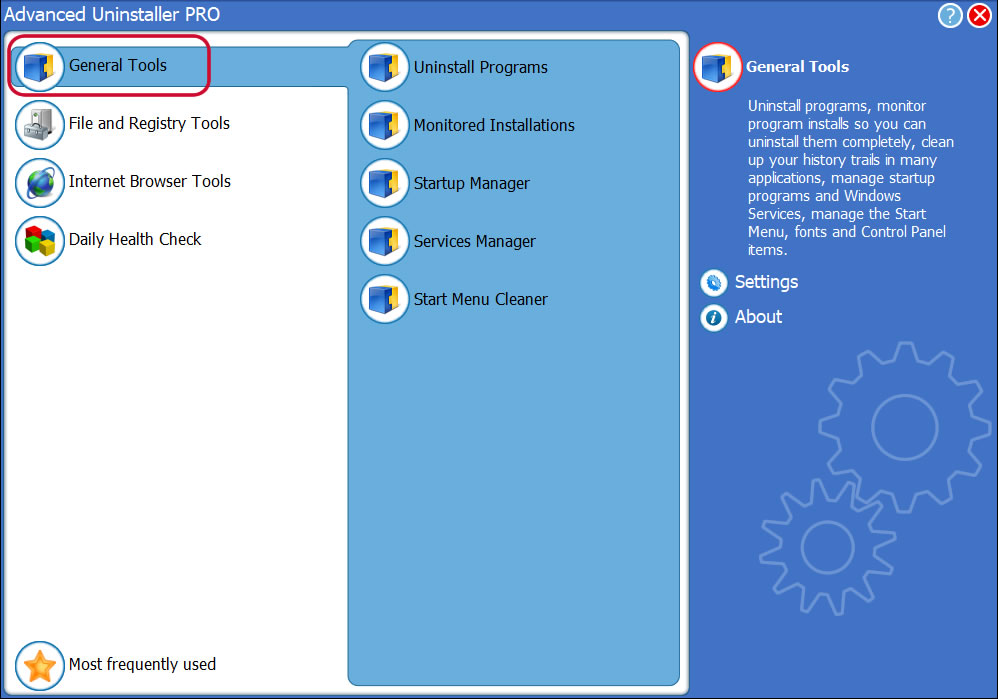
3. Press the General Tools button
4. Click on the Uninstall Programs feature
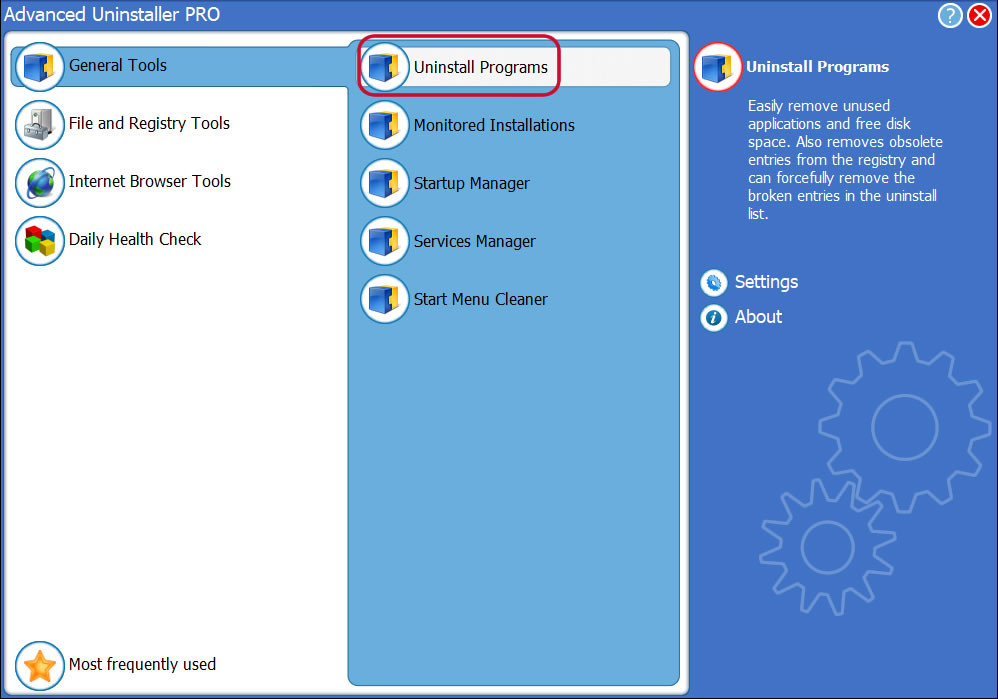
5. All the applications installed on the computer will be made available to you
6. Scroll the list of applications until you find Family Tree Maker 2011 or simply activate the Search feature and type in "Family Tree Maker 2011". The Family Tree Maker 2011 program will be found very quickly. After you click Family Tree Maker 2011 in the list of programs, some data regarding the application is shown to you:
- Safety rating (in the left lower corner). The star rating explains the opinion other users have regarding Family Tree Maker 2011, ranging from "Highly recommended" to "Very dangerous".
- Reviews by other users - Press the Read reviews button.
- Details regarding the application you are about to remove, by pressing the Properties button.
- The software company is: http://www.familytreemaker.com/
- The uninstall string is: C:\Program Files (x86)\InstallShield Installation Information\{3B3D2CFD-3C21-4AA0-94DE-45577B5BAB16}\Setup.exe

8. After uninstalling Family Tree Maker 2011, Advanced Uninstaller PRO will offer to run an additional cleanup. Click Next to perform the cleanup. All the items that belong Family Tree Maker 2011 that have been left behind will be found and you will be asked if you want to delete them. By uninstalling Family Tree Maker 2011 using Advanced Uninstaller PRO, you are assured that no Windows registry items, files or folders are left behind on your computer.
Your Windows system will remain clean, speedy and ready to take on new tasks.
Geographical user distribution


Disclaimer
The text above is not a piece of advice to uninstall Family Tree Maker 2011 by Ancestry.com from your PC, we are not saying that Family Tree Maker 2011 by Ancestry.com is not a good software application. This text only contains detailed instructions on how to uninstall Family Tree Maker 2011 supposing you decide this is what you want to do. Here you can find registry and disk entries that our application Advanced Uninstaller PRO discovered and classified as "leftovers" on other users' computers.
2016-06-26 / Written by Dan Armano for Advanced Uninstaller PRO
follow @danarmLast update on: 2016-06-25 21:05:14.607